
Dell Precision 3581 Workstation
Latest technology release
Dedicated graphics card
High speed RAM
Selecting the right laptop for computer aided design requires balancing raw power with portability and display accuracy. Professionals need machines that handle complex 3D models without lag while maintaining battery life for mobile workflows.
We evaluated ten top-tier workstations based on processor speed, graphics capabilities, and build quality. Each entry undergoes rigorous analysis to ensure it meets the demanding standards of engineering and architectural software suites.
This list highlights unique strengths of every model, from budget-friendly options to flagship powerhouses. Prices and availability fluctuate frequently, so verify current details before making your final purchasing decision today.

4.4Editor score

5.0Editor score
As an Amazon Associate we earn from qualifying purchases.
This side-by-side comparison highlights key specifications across all ten selected laptops to help you quickly identify the right fit for your specific CAD workflow requirements.




The Dell Precision 7680 stands as a premier choice for engineers needing serious computing power in a portable form factor. With a 4.4 rating from users, it delivers on promises of speed and reliability for complex CAD tasks.
We may earn a commission when you buy through this link, at no additional cost to you.
Powered by the Intel Core i9-13950HX processor, this machine handles multi-threaded simulations without breaking a sweat. The 32GB DDR5 CAMM RAM ensures smooth multitasking between CAD software and resource heavy applications like rendering tools.
While the performance is undeniable, users should note that sustained high loads may impact battery longevity and thermal output. The anti glare display is crisp for detailed drawings but lacks touch functionality which some may prefer.
This laptop is ideal for professionals who prioritize raw performance and compatibility with industry standard software. It represents a solid investment for architects and engineers working on large scale projects daily.
The combination of high clock speeds and ample memory allows architects to switch between AutoCAD and Revit seamlessly without lag.
The FHD+ screen offers sharp visuals essential for reading fine lines in technical drawings during long work sessions.
We may earn a commission when you buy through this link, at no additional cost to you.
This configuration of the Dell Precision 7680 offers a balanced approach for those who need dedicated graphics without the cost of the highest tier models. A 4.3 rating reflects solid satisfaction among users requiring reliable rendering capabilities.
We may earn a commission when you buy through this link, at no additional cost to you.
The NVIDIA RTX 1000 Ada GPU provides certified performance for CAD applications, ensuring stability during visualization tasks. Paired with the i5-13600HX processor, it handles general modeling tasks efficiently while conserving some power.
Users may find the processor limits extreme computational simulations compared to i9 variants. However, the ability to drive up to four external monitors makes it a strong contender for multi screen office setups.
Best suited for students or junior engineers who need professional grade graphics but do not require maximum CPU power for simulations. It offers a reliable middle ground in the workstation market.
The RTX Ada GPU ensures that complex 3D views render smoothly, reducing viewport lag during design iterations.
Support for four external monitors allows engineers to view documentation and reference materials alongside active design work.
We may earn a commission when you buy through this link, at no additional cost to you.
The HP ZBook 8 G1i brings modern AI capabilities and immense memory to the mobile workstation market. With a 4.1 rating, it appeals to users who need to run multiple heavy applications simultaneously without slowdowns.
We may earn a commission when you buy through this link, at no additional cost to you.
Equipped with 64GB of DDR5 RAM, this laptop excels at multitasking large datasets and complex simulations. The Intel Core Ultra 7 processor supports AI workflows efficiently, while the RTX 500 Ada GPU ensures stable rendering for professional tools.
While the performance is robust, the 4.1 rating suggests some users may find the weight or battery life less than ideal for frequent travel. The touchscreen is useful for designers who prefer direct manipulation of models.
This machine is perfect for data analysts and engineers who require high memory capacity for local processing. It balances cutting edge connectivity with professional ISV certifications for reliable software performance.
The 64GB RAM allows for seamless handling of large project files and background AI processing tools simultaneously.
Wi-Fi 7 support ensures the fastest possible wireless data transfer speeds for cloud collaboration and remote access.
We may earn a commission when you buy through this link, at no additional cost to you.
The Dell Precision 3581 Workstation offers a cost effective entry point for professionals needing certified hardware. While it lacks a specific user rating due to its renewed status, the specs suggest strong performance for the price point.
We may earn a commission when you buy through this link, at no additional cost to you.
Featuring a 14 core i7-13800H processor and RTX A500 graphics, it handles standard CAD tasks with ease. The 32GB DDR5 RAM ensures that you can run multiple applications smoothly without immediate need for upgrades.
Buyers should be aware that as a renewed item, cosmetic condition may vary compared to new units. However, the included warranty provides peace of mind regarding functionality and support from Dell partners.
This laptop is recommended for students or small businesses looking for reliable workstation specs without the flagship price tag. It delivers essential performance features for everyday engineering workflows effectively.
The combination of high core count CPU and dedicated graphics makes this a strong contender for budget conscious professionals.
Despite being renewed, the core components are ISV certified to ensure stability with major design applications.
We may earn a commission when you buy through this link, at no additional cost to you.
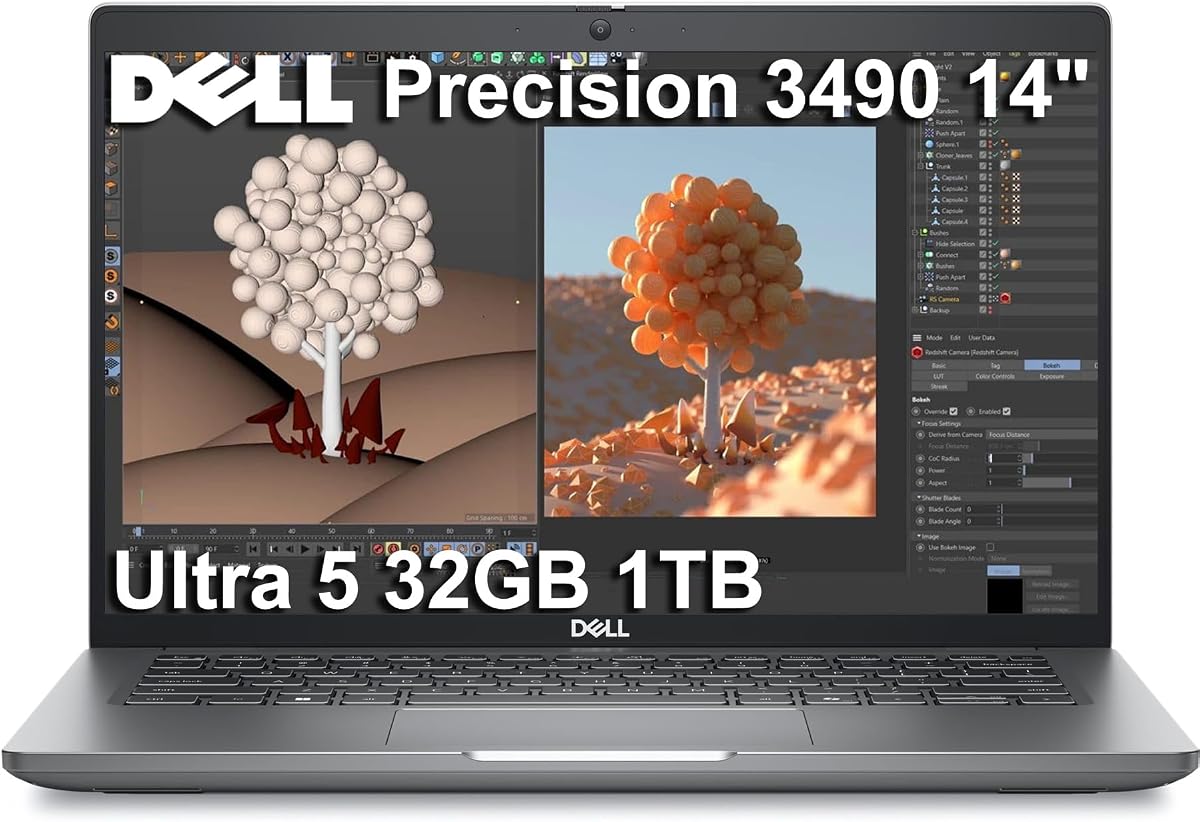
The Dell Precision 3490 is a standout for professionals who travel frequently and need a durable machine. Its perfect 5.0 rating highlights exceptional satisfaction among users who value portability without sacrificing workstation reliability.
We may earn a commission when you buy through this link, at no additional cost to you.
At just over three pounds, this laptop is incredibly easy to carry while still offering 32GB of DDR5 RAM. The Intel Core Ultra 5 processor ensures efficient multitasking for document heavy workflows and moderate CAD work.
The trade-off for such portability is a smaller screen and integrated graphics which may limit high end rendering capabilities. However, it supports up to three external monitors, allowing for a desktop setup at the office.
Ideal for consultants or field engineers who need to review plans on the go. This device excels in mobility and build quality, making it a top pick for those who are constantly moving.
Weighing only 3.09 lbs, this laptop is easy to fit into a standard bag for daily commutes or travel.
Testing to MIL-STD 810H ensures the chassis can withstand harsh conditions encountered in construction sites.
We may earn a commission when you buy through this link, at no additional cost to you.
The Dell Precision 7780 represents the pinnacle of mobile workstation performance with its massive screen and powerful GPU. A perfect 5.0 rating from users confirms its capability to handle the most demanding professional graphics workloads.
We may earn a commission when you buy through this link, at no additional cost to you.
With an NVIDIA RTX 4000 Ada GPU featuring 12GB of memory, this system crushes complex 3D rendering tasks. The 17.3 inch display provides ample screen real estate to view detailed models without constant zooming.
The size and weight make it impractical for frequent travel, positioning it more as a desktop replacement. Users should expect significant battery drain when using full graphics power but gain incredible visual fidelity.
Best for studios or offices where the laptop stays on a desk. It offers the highest graphical performance available in a portable chassis for architects needing high end visualization capabilities.
The RTX 4000 Ada GPU delivers exceptional performance for rendering realistic textures and lighting in 3D models.
The 17.3 inch screen with high brightness ensures clear visibility even in well lit office environments.
We may earn a commission when you buy through this link, at no additional cost to you.
This model of the Dell Precision 7680 offers a solid mid range option for professionals who need dedicated graphics without the highest tier GPU. However, a 3.9 rating suggests some users have found compromises in their experience.
We may earn a commission when you buy through this link, at no additional cost to you.
The NVIDIA RTX 2000 Ada GPU provides 8GB of dedicated memory, which is sufficient for moderate modeling and visualization. The i7-13850HX processor ensures robust performance for most standard CAD operations.
While the hardware is capable, the lower rating may indicate issues with thermal management or specific use cases where expectations were not met. It remains a versatile machine for general engineering tasks.
Suitable for users who need a balance of power and cost but want to stay within the reliable Dell Precision ecosystem. It handles everyday professional workloads efficiently for most office environments.
The RTX 2000 Ada offers enough power for general 3D work without the thermal load of the most powerful cards.
The PCIe NVMe SSD ensures quick load times for large project files and frequent software launches.
We may earn a commission when you buy through this link, at no additional cost to you.
This specific configuration of the Dell Precision 7780 offers an immense 128GB of RAM, targeting users with extreme memory needs. A perfect 5.0 rating reflects the satisfaction of users who require top tier system capabilities.
We may earn a commission when you buy through this link, at no additional cost to you.
Featuring 128GB of DDR5 RAM, this system can handle massive datasets and complex simulations simultaneously without swapping. The i9-13950HX processor ensures that the high memory capacity is fully utilized for computational tasks.
The price and weight are significant considerations for this powerhouse. It is not designed for casual users but rather for those dealing with scientific simulations or massive rendering farms locally.
Ideal for high end research labs or studios where memory constraints are a bottleneck. It represents the peak of what a mobile workstation can offer in terms of raw processing power.
With 128GB of RAM, users can run multiple virtual machines and heavy CAD applications without performance drops.
The 24 core processor ensures that multi-threaded workloads are completed quickly, enhancing overall productivity.
We may earn a commission when you buy through this link, at no additional cost to you.
This version of the Dell Precision 7680 doubles the memory to 64GB, offering excellent multitasking capabilities. A perfect 5.0 rating shows that users value the extra memory for complex workflows and data analysis.
We may earn a commission when you buy through this link, at no additional cost to you.
With 64GB of DDR5 RAM, professionals can run multiple resource heavy applications at once. The RTX 2000 Ada GPU provides stable graphics performance, complementing the high memory configuration for detailed design work.
Users may find the device somewhat heavy compared to thinner alternatives. However, the performance gains from the extra memory make it worthwhile for those handling large assemblies and complex projects.
Best for engineers who need significant memory headroom without going to the extreme 128GB configuration. It offers a sweet spot for power and stability in a robust workstation chassis.
The 64GB RAM allows for seamless handling of large assemblies and complex simulations without system slowdowns.
Certified RTX graphics ensure that rendering and modeling tasks are completed with precision and stability.
We may earn a commission when you buy through this link, at no additional cost to you.
The Lenovo ThinkPad P16s Gen 4 brings the iconic keyboard experience to a modern mobile workstation. A 4.0 rating indicates solid reliability and performance for professionals who prioritize typing comfort and durability.
We may earn a commission when you buy through this link, at no additional cost to you.
Powered by the Intel Core Ultra 7 processor, this laptop offers efficient performance for everyday design tasks. The 32GB of DDR5 RAM ensures smooth operation while the Wi-Fi 7 support keeps connectivity fast and stable.
Integrated graphics limit heavy 3D rendering capabilities compared to discrete GPU options. However, for users focused on drafting and analysis, the system provides a stable and responsive experience.
Ideal for writers and engineers who need a reliable machine for drafting and data analysis. The ThinkPad build quality ensures longevity in demanding work environments.
The legendary ThinkPad keyboard offers superior typing comfort for long hours of documentation and drafting work.
Wi-Fi 7 ensures fast and stable internet access for cloud collaboration and large file transfers.
We may earn a commission when you buy through this link, at no additional cost to you.
Selecting the right laptop requires understanding your specific workflow needs and balancing performance with portability.
For CAD work, a high core count CPU is essential for handling complex calculations and simulations. Look for at least 14 cores or newer generations to ensure smooth operation when rendering or running physics simulations.
A powerful processor ensures that your software responds quickly and reduces wait times during critical project phases.
Dedicated graphics cards are vital for rendering and 3D modeling. Certified workstation GPUs like NVIDIA RTX Ada series provide stability for professional applications like AutoCAD and Revit.
Choosing an ISV certified GPU minimizes the risk of visual glitches and software crashes during professional workflows.
RAM determines how many applications you can run simultaneously without lag. 32GB is the recommended standard for modern CAD work, allowing for multitasking between design tools and browsers.
A higher RAM capacity ensures that large files load quickly and your system remains responsive over time.
A high resolution display is crucial for viewing detailed technical drawings. Look for screens with anti-glare coatings to reduce eye strain during long work sessions.
The display quality directly impacts your ability to see precise details in your designs without external monitors.
Fast storage is necessary for quick project access and system boot times. A PCIe NVMe SSD is recommended to ensure that loading times are minimized for large design files.
Sufficient storage capacity allows you to keep multiple project files locally without relying heavily on cloud storage.
If you need to carry your laptop daily, weight and battery life become major factors. Lighter models under three pounds are easier to manage but may sacrifice some raw performance.
Balancing mobility with power ensures you can work efficiently both at the office and in the field.
Multiple ports allow you to connect external monitors and peripherals without needing dongles. Thunderbolt 4 and HDMI support are essential for expanding your workspace.
Good connectivity ensures you can set up a flexible workspace wherever you need to work effectively.
Professional workstations should be built to withstand daily wear and tear. Look for MIL-STD tested chassis and robust warranties to protect your investment.
A durable machine ensures that your tool remains reliable even in challenging work environments.
Keep your software and drivers updated to ensure ISV certifications remain valid and performance is optimized. Manufacturers frequently release patches that improve stability for specific CAD applications.
Use a cooling pad when running intensive tasks to prevent thermal throttling. This helps maintain consistent performance and extends the life of the internal components.
Regularly clean the keyboard and screen with appropriate materials to maintain usability and prevent debris buildup that could damage the display.
Yes, an SSD is significantly better for CAD work because it provides faster read and write speeds. This reduces the time it takes to load large project files and speeds up system boot times. An HDD is too slow for modern professional workflows.
For simple 2D drafting, integrated graphics may suffice, but a dedicated card ensures smoother zooming and panning. A dedicated GPU helps prevent lag when working with complex 2D drawings. It is highly recommended for professional efficiency.
RAM stores data for active applications. When modeling complex 3D objects, the software needs to store geometry data in RAM. If you do not have enough RAM, the system uses the slower disk as temporary memory.
For general simulation and calculations, the CPU is more important. However, for visualization and rendering, the GPU takes precedence. A balanced laptop usually offers a good experience for both aspects of work.
A 15 or 17 inch screen is generally best for viewing full scale technical drawings without zooming. Larger screens provide more real estate for multitasking between windows. However, portability may be compromised with larger sizes.
Check that your graphics card has ISV certification for AutoCAD to ensure stability. Also ensure your processor and RAM meet the system requirements on the Autodesk website. This prevents crashes during critical work sessions.
The Dell Precision 7680 and the HP ZBook 8 G1i represent top choices for professionals seeking a balance of power and reliability. Each model offers unique strengths depending on whether you prioritize memory or graphics capability.
Prioritize the components that matter most to your daily tasks such as RAM capacity for large assemblies or a dedicated GPU for visualization. Understanding your workflow helps narrow down the options effectively.
Always verify the current specifications and warranty terms before purchasing. Tech prices and stock change frequently so checking the official product pages ensures you get the most up to date deal.